Flydigi Apex 5
Ape X|S
Bottom line: I want a gamepad with four programmable back buttons. It’s a disability thing: my right thumb starts to hurt after a while. But I’ve been into gamepads for a long time, so not only do I have a pretty decent collection, but I’ve also have become pretty picky about what I like.
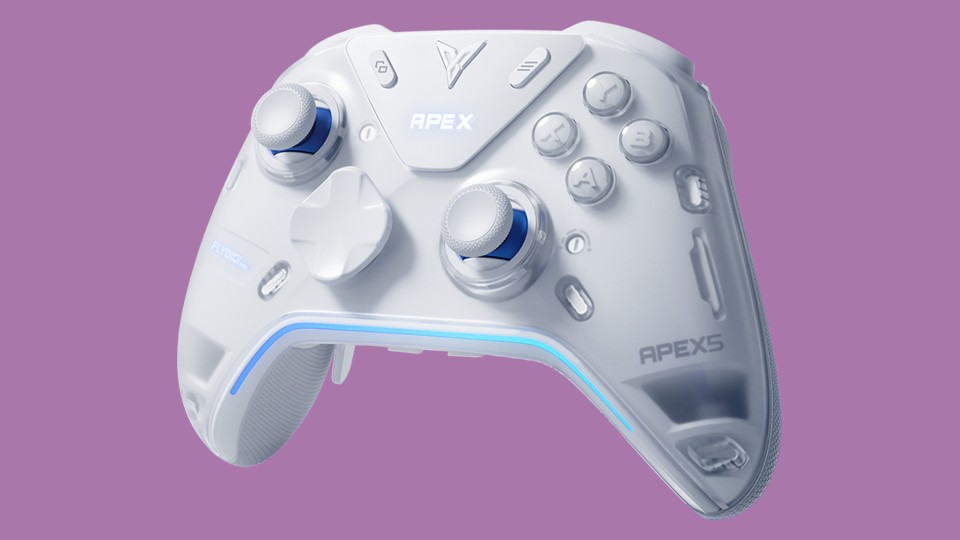
Why did I choose the Flydigi Apex 5? In short, no software is needed, it has six programmable buttons, dual mode triggers, and sticks that I adore.
Let’s expand on that.
No software needed… is mostly true. With a screen, you can remap all six additional buttons, switch between connections, profiles, adjust triggers, and so on. However, without official software that only runs on Windows, the experience is incomplete: you don’t have access to full remapping, RGB lights, vibration settings, etc. However, you can set up everything on one Windows PC, and the settings for all profiles will work everywhere.
The four programmable buttons on the back are finally in a vertical configuration, similar to Xbox Elite gamepads. Two additional mini bumpers are back from the Apex 2. There’s not much to explain here; they all feel very comfortable.
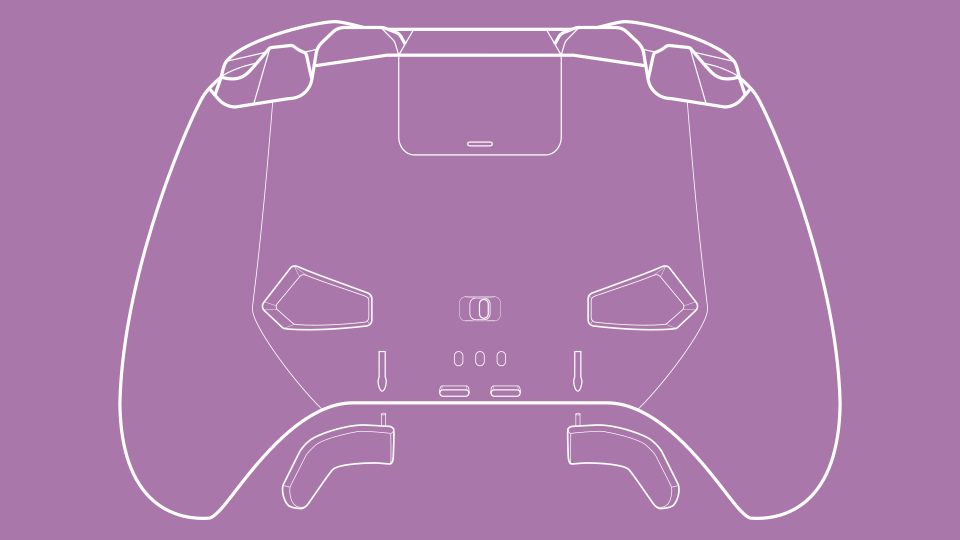
The way Apex implements dual mode triggers is a bit awkward. First of all, what does that even mean? On Nintendo Joy-Cons and Pro controllers, the four shoulder buttons are digital, they are either pressed or not. On PlayStation, Xbox and many other controllers, however, two of the buttons (triggers) are analog, meaning the further you push, the greater the output. This is primarily used in racing games to control speed, like a pedal in a car. Some gamepads now give you the option to switch between these two modes. Vader gamepads have a physical switch that limits the movement of the trigger and moves a button underneath it. Most gamepads do it that way too.
On the Apex 3 and up, force feedback does that job instead. This means you have more control over where you want that stop and can have fancier features, such as a trigger that fights you instead of stopping you. But it can feels flimsy sometimes. Again, it’s not a switch from an analog spring to a digital physical button like you have on most other gamepads. It’s a motor that waits for you to push and then applies force by turning gears to stop you or fight back. It’s sort of like a swinging door with a magnet to keep it closed instead of a bolt; you can sometimes feel it wobble. It’s not a huge deal, but I would say it’s a compromise between having more control and a solid feel.
Sticks are probably the most “me” thing of it all, the one thing I care about, but no one else does. They tend to start squeaking. They still work fine, but you can feel and often hear plastic parts rubbing against each other. And that annoys me! If you’ve ever looked at how those sticks are made, you’ve probably seen some plastic parts that are too close together, and I blame them. Whether or not it is the Hall effect is irrelevant here, by the way. The way Flydigi redesigned theirs is a bit hard to explain. You can kind of see it in their official video, and there are other in-depth reviews that explain it better, but I like to imagine two bowls (like a soup bowl, a part of a sphere), one sitting inside the other. The outer bowl is connected via one axis to the gamepad itself, and the inner bowl is connected by another axis to the outer bowl. Since the bowls don’t need to be thin, they are made of sturdier plastic. So the parts that touch are only those axes. This means less squeaking, if any!
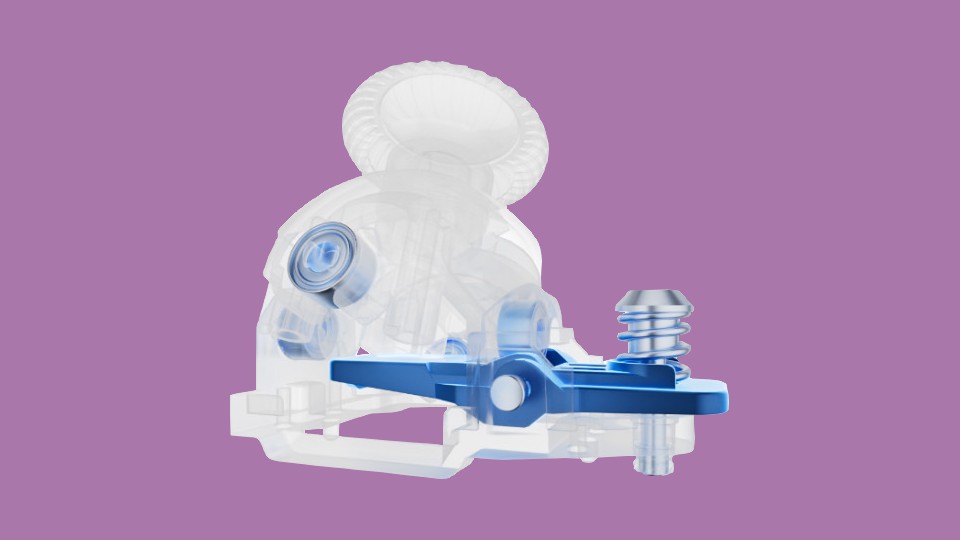
It’s also great that you can adjust the tension of the sticks so that they require minimal force but don’t wobble on their own. This helps with my thumb problem. There are three heights of replaceable sticks to choose from, but they are sold separately. I use the middle-height sticks, they are compatible with sticks from other Flydigi gamepads.
Are there any negatives? Of course! As is often the case, the software is the weak part. To be fair, Flydigi’s is pretty decent, less buggy and more finicky. I remember needing to download WeChat (I’m not joking) to change the Apex 1 settings, so anything after that is an improvement. However, I had a bad experience with the Android version, and they keep changing the Windows version: if you have a range of devices, you might need to install three versions. Well, probably only two. I don’t have any experience with the software-only features they often brag about, so I can’t say anything about that.
I also don’t like that they changed a bunch of things for no good reason. You can still swap the d-pad and stick with the previous Apex and Vader models, but the clear faceplate is different from the Apex 4 (and the Apex 3, as far as I know). They also changed the mobile phone clip, which had been there since the Apex 1, and moved the Capture button, along with the new Turbo button, to the bottom edge of the gamepad.
In addition to the regular four, you can have four Nintendo Switch profiles, but they made it more clunky than before. You have to set up a profile for the Switch as you want it, then “transfer” it to the Switch version. After that, you can change that profile to anything you like; it will not affect the Switch version. There is a way to export and import your profiles, so it’s not that cumbersome, but it’s still inconvenient.
I can also see how they could improve feature-wise, but I’d rather not say. I’m tired of buying new gamepads…
So, while I do believe that Apex 5 is a clear improvement over Apex 4, there are some annoyances. But as I said, I’m pretty picky. Is Apex 5 the best choice for everyone? Of course not!
I’m not going to list all the gamepads I own, just ones that might be important for comparison:
- Regular:
- Xbox One S and Xbox Series X|S;
- DualShock 4;
- Nintendo Switch Pro.
- Elite-ish:
- Xbox Elite 1 and 2;
- GuliKit KK3 Max;
- 8BitDo Pro 2.
- Flydigi:
- Apex 1, 2, 4 and 5;
- Vader 2 Pro and 3 Pro.
If you’re interested in how they compare, feel free to ask!
I can vouch for the quality of all the Flydigi gamepads I’ve used, except for the squeakiness (again, that might just be “me” thing). Two of them got squeaky: one of the Apex 2’s (I have two) and the Vader 2 Pro. Percent-wise, I’ve had far more problems with Xbox Elite controllers, they’re famous for that.
If I didn’t care about any of the additional features, I would’ve probably gone with their Darewolf line or even the Dune Fox, which is as basic as you can get.
The Vader line is also great. You not just get most of the Apex features, but with some steps back. Because those steps are often not back, but sideways, so they are not “cheaper, but worse”, they are legitimate alternatives to each other. In a way, Apex is a testing ground for Flydigi, with some dead ends (poor Apex 2, you were unique), and Vader is their actual flagship controller.
The QR code in the box leads you to the online version of the manual. However, I prefer to have a PDF version just in case, so I asked support for one and they sent it to me. I cropped the English page, but kept the original just in case.