Against my better judgment, I decided to continue playing horror/dark games. I found so much cool stuff last year that it seems like there’s enough left for another one. However, I will continue a subtheme from last month, modifying it to include games with companions. In fact, this theme extends beyond games to my other media consumption.
Predator: Badlands is a pretty enjoyable action flick. It won’t surprise you — you’ll know how it ends almost from the start, though there are a couple of interesting twists — but it will entertain you all the way through.
I don’t want to be on the defensive, but you have to if you want to compare Decay of Logos to other soulslikes. So, let me just call it a pretty good action RPG inspired by Dark Souls and co.
It put its own spin on almost every element of the genre, and most of them are at least interesting. Some are clearly not. Your elk steed in the game, for example, is one of those mechanics that looks good on paper but is more cumbersome than fun. It has the art style you’ve seen a million times, but it knows how to use it. There are cool locations and a pretty good atmosphere. The variety of enemies and equipment is not bad for a relatively short game. The combat is serviceable. And, hey, it’s free!
I maybe accidentally got, replayed, and 100%-ed The Last Campfire. In my defense, it’s not only the best game by Hello Games, but it’s also clearly a soulslike. You play as a lost ember (undead). You travel from campfire to campfire (bonefire), lighting them up. The world is interconnected as you constantly open new shortcuts. There are also NPCs with cryptic lines. You solve puzzles. The themes and atmosphere are similar.
And it’s also a delight!
I hate to be crawling back to Logitech, but it seems like they still make decent mice at a good price-to-feature ratio, especially if you lower your expectations. My minimal requirements are a wireless mouse with programmable buttons that work without software.
The Logitech G304 is that mouse. It’s wireless only with a dongle, there’s no multi-device or Bluetooth capability. It runs on one double-A battery that cannot be charged inside the device. You can set up one on-board profile with DPI settings and custom shortcuts, including G-Shift, which allows you to hold one button and use the others for different functions.
The benefit of going with a popular brand is that someone, somewhere, will do something about it. For example, a battery percentage could be shown as a tray icon on Windows without official software installed.
Another mouse that I’ve had for a while that almost fits the bill is the Razer Orochi V2. Here are the main differences, according to me:
G304
Orochi v2
Size
Medium
Small
Connection
Dongle
Dongle/Bluetooth
Power
AA
AA/AAA
On-board
Yes
Kinda
It’s slightly smaller, but not in an uncomfortable way. You can pair it to two devices and quickly switch between them if you don’t mind the Bluetooth connection. You can make it even lighter by using a triple-A battery. But I chose to designate it as my secondary mouse for non-main PCs because of the shortcuts.
On G304, you can assign keyboard shortcuts, such as Ctrl + Shift + T or Super + Shift + →, as macros. These macros live in the device itself, you don’t need software running. While you can customize Orochi V2 in the same way, including the DPI, Hypershift (the G-Shift equivalent), and even slightly more (the up and down scroll wheel functions are assignable), for some bizarre reason, you can’t assign some shortcuts as, well, shortcuts, only as macros. And all macros require software. So, you can have Ctrl + Shift + T but not Super + Shift + →. It’s not a huge deal since you can change the shortcuts in the operating system, but it’s still somewhat annoying.
Bottom line: I want a gamepad with four programmable back buttons. It’s a disability thing: my right thumb starts to hurt after a while. But I’ve been into gamepads for a long time, so not only do I have a pretty decent collection, but I’ve also have become pretty picky about what I like.
[It’s up there]
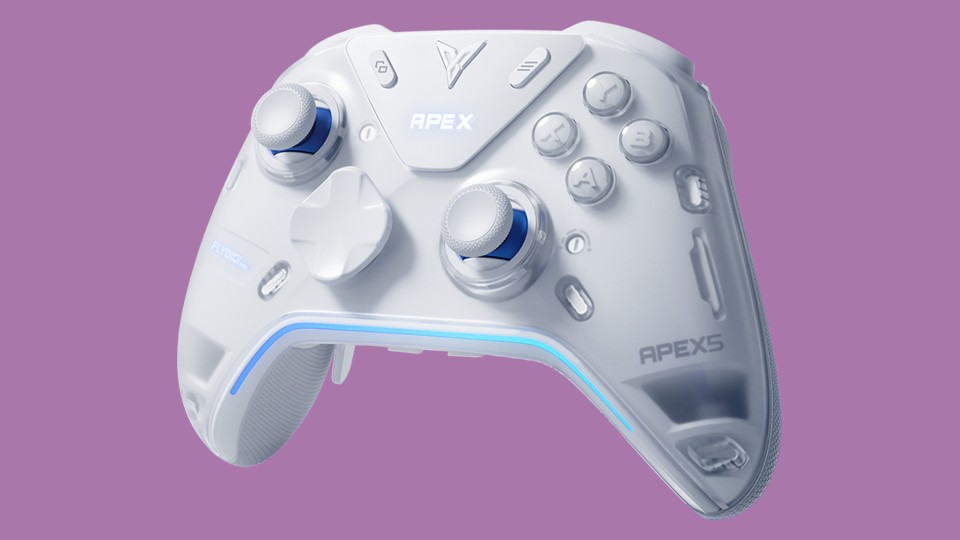
Why did I choose the Flydigi Apex 5? In short, no software is needed, it has six programmable buttons, dual mode triggers, and sticks that I adore.
Let’s expand on that.
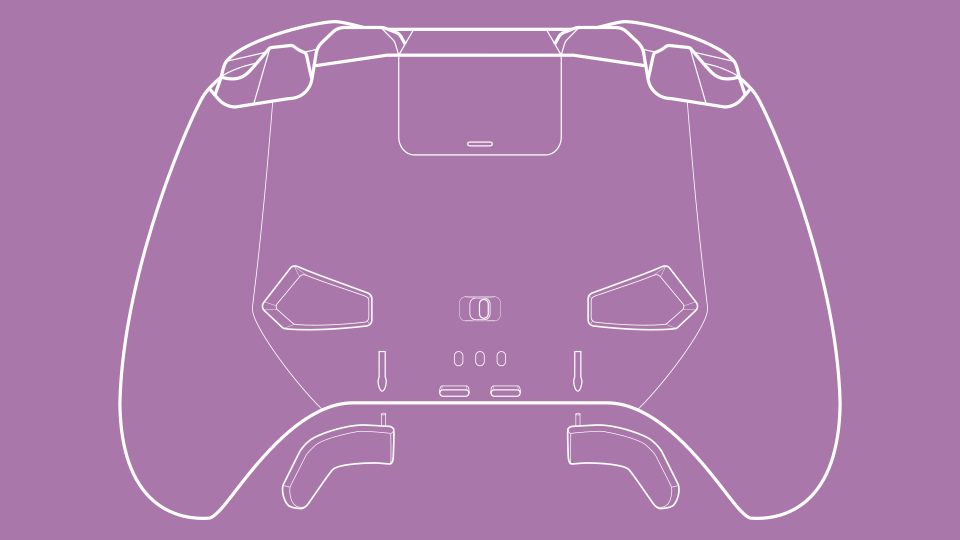
No software needed… is mostly true. With a screen, you can remap all six additional buttons, switch between connections, profiles, adjust triggers, and so on. However, without official software that only runs on Windows, the experience is incomplete: you don’t have access to full remapping, RGB lights, vibration settings, etc. However, you can set up everything on one Windows PC, and the settings for all profiles will work everywhere.
The four programmable buttons on the back are finally in a vertical configuration, similar to Xbox Elite gamepads. Two additional mini bumpers are back from the Apex 2. There’s not much to explain here; they all feel very comfortable.
[Plying with paddles]
The way Apex implements dual mode triggers is a bit awkward. First of all, what does that even mean? On Nintendo Joy-Cons and Pro controllers, the four shoulder buttons are digital, they are either pressed or not. On PlayStation, Xbox and many other controllers, however, two of the buttons (triggers) are analog, meaning the further you push, the greater the output. This is primarily used in racing games to control speed, like a pedal in a car. Some gamepads now give you the option to switch between these two modes. Vader gamepads have a physical switch that limits the movement of the trigger and moves a button underneath it. Most gamepads do it that way too.
On the Apex 3 and up, force feedback does that job instead. This means you have more control over where you want that stop and can have fancier features, such as a trigger that fights you instead of stopping you. But it can feels flimsy sometimes. Again, it’s not a switch from an analog spring to a digital physical button like you have on most other gamepads. It’s a motor that waits for you to push and then applies force by turning gears to stop you or fight back. It’s sort of like a swinging door with a magnet to keep it closed instead of a bolt; you can sometimes feel it wobble. It’s not a huge deal, but I would say it’s a compromise between having more control and a solid feel.
Sticks are probably the most “me” thing of it all, the one thing I care about, but no one else does. They tend to start squeaking. They still work fine, but you can feel and often hear plastic parts rubbing against each other. And that annoys me! If you’ve ever looked at how those sticks are made, you’ve probably seen some plastic parts that are too close together, and I blame them. Whether or not it is the Hall effect is irrelevant here, by the way. The way Flydigi redesigned theirs is a bit hard to explain. You can kind of see it in their official video, and there are other in-depth reviews that explain it better, but I like to imagine two bowls (like a soup bowl, a part of a sphere), one sitting inside the other. The outer bowl is connected via one axis to the gamepad itself, and the inner bowl is connected by another axis to the outer bowl. Since the bowls don’t need to be thin, they are made of sturdier plastic. So the parts that touch are only those axes. This means less squeaking, if any!
[Screw attack]
It’s also great that you can adjust the tension of the sticks so that they require minimal force but don’t wobble on their own. This helps with my thumb problem. There are three heights of replaceable sticks to choose from, but they are sold separately. I use the middle-height sticks, they are compatible with sticks from other Flydigi gamepads.
Are there any negatives? Of course! As is often the case, the software is the weak part. To be fair, Flydigi’s is pretty decent, less buggy and more finicky. I remember needing to download WeChat (I’m not joking) to change the Apex 1 settings, so anything after that is an improvement. However, I had a bad experience with the Android version, and they keep changing the Windows version: if you have a range of devices, you might need to install three versions. Well, probably only two. I don’t have any experience with the software-only features they often brag about, so I can’t say anything about that.
I also don’t like that they changed a bunch of things for no good reason. You can still swap the d-pad and stick with the previous Apex and Vader models, but the clear faceplate is different from the Apex 4 (and the Apex 3, as far as I know). They also changed the mobile phone clip, which had been there since the Apex 1, and moved the Capture button, along with the new Turbo button, to the bottom edge of the gamepad.
In addition to the regular four, you can have four Nintendo Switch profiles, but they made it more clunky than before. You have to set up a profile for the Switch as you want it, then “transfer” it to the Switch version. After that, you can change that profile to anything you like; it will not affect the Switch version. There is a way to export and import your profiles, so it’s not that cumbersome, but it’s still inconvenient.
I can also see how they could improve feature-wise, but I’d rather not say. I’m tired of buying new gamepads…
So, while I do believe that Apex 5 is a clear improvement over Apex 4, there are some annoyances. But as I said, I’m pretty picky. Is Apex 5 the best choice for everyone? Of course not!
I’m not going to list all the gamepads I own, just ones that might be important for comparison:
Regular:
Xbox One S and Xbox Series X|S;
DualShock 4;
Nintendo Switch Pro.
Elite-ish:
Xbox Elite 1 and 2;
GuliKit KK3 Max;
8BitDo Pro 2.
Flydigi:
Apex 1, 2, 4 and 5;
Vader 2 Pro and 3 Pro.
If you’re interested in how they compare, feel free to ask!
I can vouch for the quality of all the Flydigi gamepads I’ve used, except for the squeakiness (again, that might just be “me” thing). Two of them got squeaky: one of the Apex 2’s (I have two) and the Vader 2 Pro. Percent-wise, I’ve had far more problems with Xbox Elite controllers, they’re famous for that.
If I didn’t care about any of the additional features, I would’ve probably gone with their Darewolf line or even the Dune Fox, which is as basic as you can get.
The Vader line is also great. You not just get most of the Apex features, but with some steps back. Because those steps are often not back, but sideways, so they are not “cheaper, but worse”, they are legitimate alternatives to each other. In a way, Apex is a testing ground for Flydigi, with some dead ends (poor Apex 2, you were unique), and Vader is their actual flagship controller.
The QR code in the box leads you to the online version of the manual. However, I prefer to have a PDF version just in case, so I asked support for one and they sent it to me. I cropped the English page, but kept the original just in case.
I read, watched, and re-watched Kiki’s Delivery Service. Well, kind of.
The cartoon and
the book are delightful, and more or less the same story (the book doesn’t have a dramatic finale). But the live-action movie… I couldn’t finish it, it’s cringe-worthy.
it is silent at low load and slightly noisy at high load (I can compare the noise level to Nintendo Switch or Xbox Series S) – I have become more sensitive to mechanical and electrical noise lately, so this is a big plus;
it gives me a reason to daily drive Linux, since it can’t run “heavy” games (so installing Windows doesn’t make sense);
but it can run some games, which gives me an opportunity to test games on Linux;
not a problem, but tinkering is fun!
I’m not here to promote a specific brand, so I’ll say it’s an AMD Ryzen 5 5560U machine. AMD has served me well with my latest PC, since it is better with Linux, so that was one of the reasons I bought it.
So, yes, now it is my main work, media, some gaming machine. The worst thing is that it’s so small that I don’t have room to put a sticker of Chihiro on it. At this point, I name my machines after characters from Miyazaki’s works: I also have a big PC I built last year called Nausicaä, and a small laptop-tablet hybrid called Kiki.
This January marks one year since I started this blog. I have been tinkering with it ever since, but for this occasion I added a light theme and a search. Static sites have one disadvantage, they don’t do search themselves. You can mitigate this in a number of ways, I decided to go with DuckDuckGo. It seems to work well.
When you’re young, everyone is very eager to tell you that you’ll lose your strong opinions when you get older. I’m still waiting.
What actually happened to me is that I realized that it is impossible to have a strict rule – of law, moral, or any other kind – without many exceptions. Sometimes so many that it’s better to turn the rule on its head (from “it’s good unless” to “it’s bad unless” kind of thing).
I’ll use games as an example.
Let me put it this way, I’m not fun at parties: if you say to me “hey, remember that cool game?” I’m going to remember that it was published by a company that thought it was a good idea to advertise on 8chan, or that the developers were harassed and crunched a lot, or that despite having, like, two female characters, the game was both sexist and transphobic.
I also never thought that games were better back then, or that they ruined it, or anything like that. I felt like I evolved with the games, more or less. (To be fair, that has changed a bit in the last, say, 5 years or so, where I feel there are not enough games that challenge me with something new, but that is another story.)
Basically, what I’m saying is that I don’t do nostalgia. I don’t put old games on a pedestal. I rarely replay games.
But.
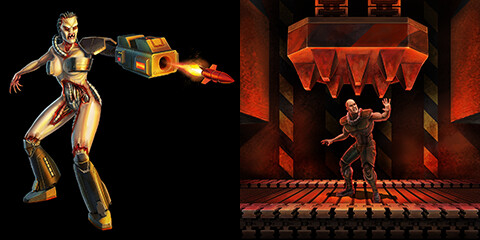
I spend about a week replaying the Quake II campaign, and playing all three mission packs, old and new, for the first time. I can’t deny that there’s a pleasure, a comfort in that experience. Q][ is my Doom. I played all the versions – PC, Nintendo 64 and PlayStation. I found excuses to replay it a few times, like playing it with a Steam Controller.
I’ll talk about the re-release in the monthly summary, for now I’ll just point out that I have complicated feelings about it. There’s a lot not to like about the game, and I can’t really come up with an argument for someone who’s never played it to give it a try. I don’t think there’s any undeniable value in it. But I like it, I still do.
I’m not writing this to make excuses. I’m not writing this to say that it’s okay to have problematic faves. I still believe there are hills to die on, and I have plenty of them. I’m writing it to say that you can only hope – I can only hope – that you have a decent grasp on those very fuzzy good and bad things and can apply them as best as you can. Because I’m pretty sure there is no alternative.